HubSpot Integration Playbook: Turn your CRM into a financial advisor prospecting engine
.avif)
.avif)
.avif)
What's inside
- Why clean data wins
- Let's get your house in order
- What the integration does, at a glance
- The clean contact record
- The clean company record
- The clean team record
- Update rules built at the field level
- The data you cannot get in a standard CRM
- Active Lists that work for you
- Act on it: marketing and outreach in HubSpot
- Built for how your team sells
- Getting started
Why clean data wins
Most CRMs in wealth management rely on data that goes stale fast and takes manual work to keep current. Firm and advisor details get entered once and rarely updated, AUM figures and rep moves lag by quarters, and the timing signals that actually drive deals, a firm hire, a book move, a registration change, rarely make it into the CRM at all.
AdvizorPro fixes that. Our team gets your records clean, structured, and current first, then the integration keeps pushing fresh advisor and firm intelligence straight into HubSpot from there. No exports, no manual lookups, and no data wrangling on your end.
This playbook shows what lands on your records, the data you cannot get elsewhere, the lists that surface opportunities automatically, and how to turn all of it into outreach that books meetings.
Griffin Capital ran into this problem before working with AdvizorPro. See how they automated their CRM workflow with AdvizorPro to build a smarter, more confident distribution team.
Let's get your house in order
Before anything gets automated, we clean up what's already there. This is led by our integration specialist team and it is part of onboarding, not an extra step you have to manage.
- Map CRDs: Get every record tied to a verified CRD, even if you're starting from little or none.
- Identify duplicates: Flag and reconcile duplicate records so reps aren't working two versions of the same firm or advisor.
- Update stale records: Refresh outdated contact info, expired registrations, and advisors who've since retired or moved on.
- Enrich what's there: Add the context standard records are missing, tech stack detection for wealthtechs, platform and investment theme signals for asset managers, and more.
What the integration does, at a glance
- Auto-populates: Fills your Company and Contact records automatically with AdvizorPro firm, team, and contact intelligence.
- Stays current: Keeps AUM, headcount, registrations, tech stack, and advisor moves current on AdvizorPro's update cadence. No spreadsheets to maintain.
- Goes deeper: Adds dozens of fields a standard CRM cannot capture, from 13F holdings to SMA composition to breakaway dates.
- Drives action: Feeds native HubSpot Active Lists and Workflows, so the data does the prospecting for you.
The clean contact record
Every advisor record arrives complete. Identity, registrations, designations, tenure, and direct contact details are seamlessly integrated with the standard HubSpot fields your reps use every day.

- Advisor Details: RIA, BD, or dual status, registration status, title, designations, licenses, and verified links to AdvizorPro, FINRA, and the SEC.
- Firm Registration: Current RIA and broker dealer names with CRDs, plus years of experience and tenure with each firm.
- Firm Registration History: Prior firm, prior CRDs, and the exact firm change date. This is the foundation for every advisor moves play later in this guide.
The clean company record
Firm records come loaded with the numbers your team would otherwise chase across ADV filings and provider sites. Best of all, it lives in one place. Firm Info, AUM, Growth Metrics, tech stack, and tags all sit on a single AdvizorPro tab, so reps stop switching between screens to piece a firm together.

- Firm Info: CRD, firm type, registration status, custodians, broker dealer affiliation, employee and rep counts, and percent in ETFs.
- AUM: Total AUM, average AUM per advisor, account counts, average account size, and the full discretionary and non discretionary split.
- Growth Metrics: One, three, and five year AUM growth in dollars and percent, CAGR figures, and firm insighs.
- Tags: Custodian, client persona, and investment vehicle keywords you can segment and target on instantly.
The clean team record
Standard CRM hierarchy breaks down fast in wealth management. A wirehouse "firm" is really hundreds of branches and teams, and your reps need to know which one they're actually talking to.
We build real parent-child hierarchy (Salesforce) or primary-secondary affiliations (HubSpot), and we support branch, team, and fully custom objects on top of that.
Example: Scott A'Hearn is a Merrill Lynch advisor at 510 E 96th St, Indianapolis. His parent company is Merrill Lynch, the branch account he's attached to has 108 advisors, and three of those, including Scott, sit on the "A'Hearn Stevens & Associates" team, a custom object we track separately. That team is a Forbes 2026 Best-In-State Wealth Management Team with $444M in AUM, and Scott himself is individually recognized as a Forbes 2026 Best-In-State Wealth Advisor.
Inverse example: The Bahnsen Group of Hightower manages $4.4B across 43 advisors, headquartered in Newport Beach, CA, with offices in nine other states. Because the custom object identifies which advisors report to the CA-based team, a rep covering Florida knows not to reach out to Bahnsen advisors in Florida, they're covered by the California owner instead.
That's the difference between a CRM that just stores firm names and one that understands who actually owns which relationship.
Update rules built at the field level
Most integrations force one update setting across every field. We let you set it property by property.
If Robert goes by Bob, you probably want that set to "update if empty," so a rep's manual correction doesn't get overwritten. But if his email changes from an lpl.com domain to his new firm's address, you want that to overwrite automatically, that's not a preference.
This is only possible because we built our own integration rather than relying on a third-party sync tool, which is what most competitors do. One common competitor, for example, splits CRD data across "CRD," "competitor CRD," and "competitor ID," a distinction that adds confusion instead of clarity.
We also handle territory setup up front, so leads route to the correct account owner from day one and stay routed correctly as records update. Each configuration is QA tested in a sandbox before it touches your production CRM.
The data you cannot get in a standard CRM
Beyond the basics, AdvizorPro can bring intelligence that a stock CRM has no field for. This is where reps stop guessing and start tailoring.
A quick note on availability. What lands on your records is case by case and depends on the AdvizorPro datasets your firm licenses, so treat the items below as what is possible, not a fixed list. And if you bring your own data pack, that data can be mapped into the firm profiles too, right alongside the AdvizorPro fields.
13F holdings
For firms that file 13Fs, AdvizorPro brings reported positions and firm level holdings into HubSpot. Asset managers can see who already holds exposure to a strategy and size the conversation accordingly.
Client types and asset breakdown
Client counts and dollars by segment, including high net worth, individuals, retirement plans, charities, and corporations. You learn who a firm actually serves before the first call.
SMA composition
Separately managed account assets broken out by sleeve, from equities and public funds to corporate credit and cash. Distribution teams can match products to mandate in seconds.
Plus everything around it
Custodian breakdown, family office flags, and the keyword tags that make precise segmentation possible, all on the same record.
Note: the exact fields shown depend on your AdvizorPro datasets, and licensed data packs can be mapped into firm profiles too.
Active Lists that work for you
Active Lists are the engine of the integration. Because AdvizorPro keeps the underlying fields current, a list you build once keeps refreshing itself, pulling in new advisors the moment they match your criteria. The three below are just examples. You can build a list around any AdvizorPro field, so treat them as a starting point, not the menu.
Advisor Moves
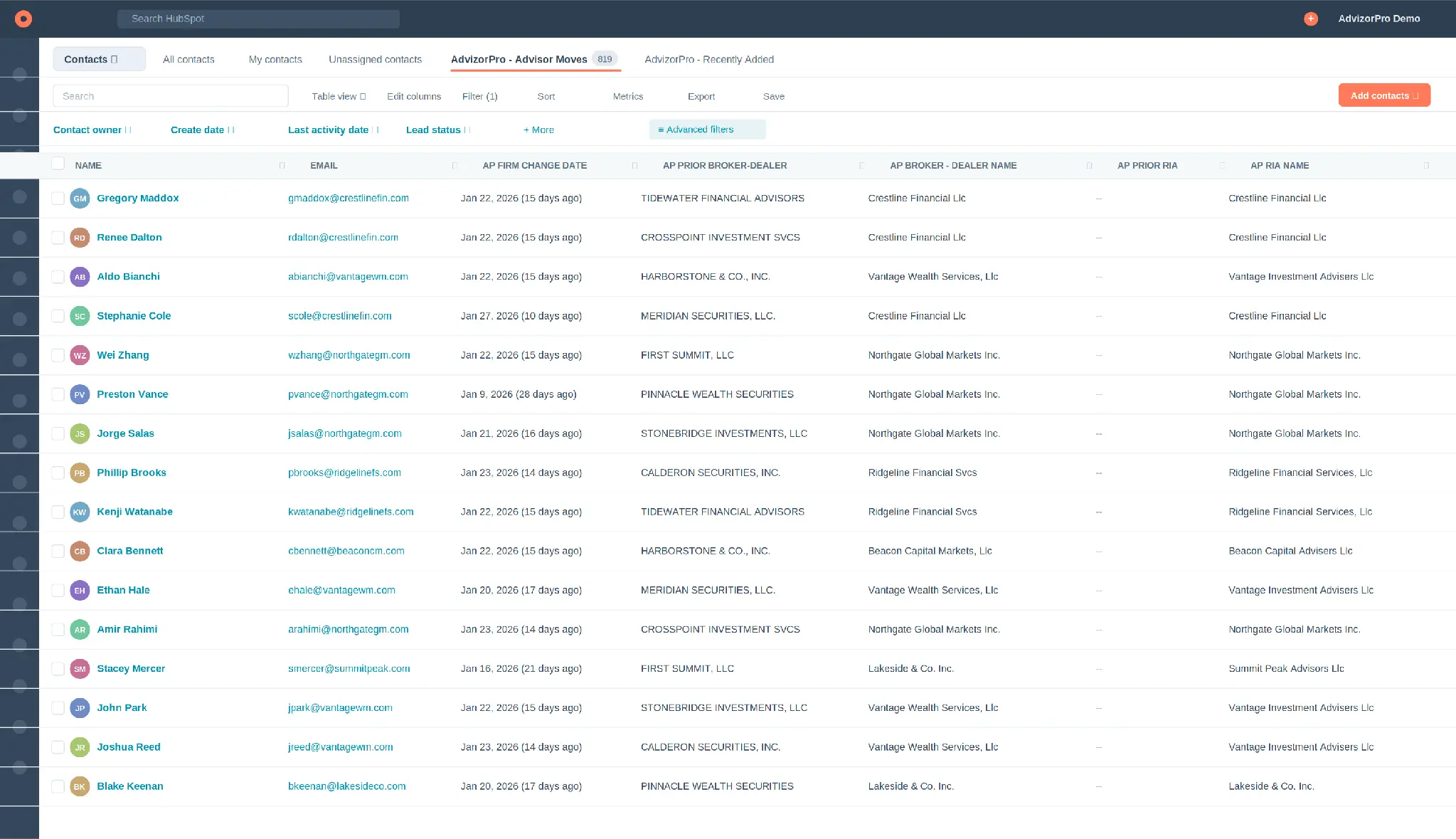
Advisors who just changed firms are the warmest audience in the industry. They are re-evaluating tools, custodians, and partners right now. This list watches the firm change date and surfaces every advisor who moved recently, with their prior and current firm side by side.
Team Moves
Sometimes a whole team lifts out, not just one advisor. Wirehouses operate through hundreds of DBAs, and AdvizorPro tracks the individual teams that sit underneath them, so a name that looks like one giant firm resolves into the real practices and people behind it. Team Moves groups advisors who share a prior firm and a recent change date, so you can spot lift outs and go straight to the decision maker.
Use it for recruiting plays and high value, team level outreach.
Breakaway Advisors
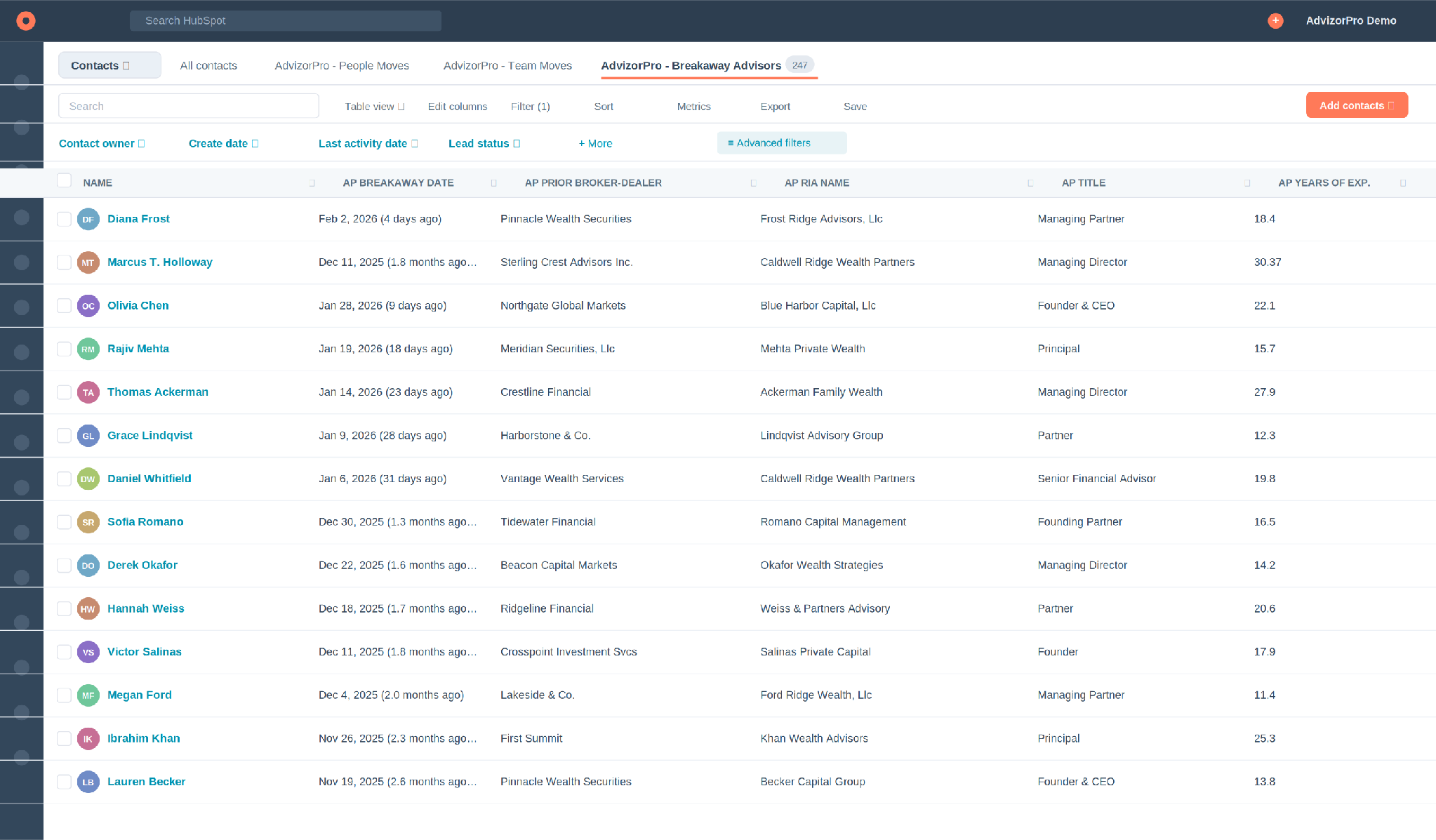
Advisors leaving a wirehouse or large broker dealer to go independent are prime targets for custodians, platforms, and wealthtech. This list filters on the breakaway signal and shows prior firm, new RIA, title, and experience.
Use it for recruiting, platform and custody pitches, and product distribution.
Recent Website Visitors (TrafficIQ)
Intent beats cold every time. TrafficIQ identifies the firms visiting your website, even when they never fill out a form, and the integration brings that signal into HubSpot. This list surfaces the firms and advisors that stopped by recently, so your team can reach out while interest is hot.
Use it for warm outreach to firms already researching you, retargeting, and prioritizing the day's call list.
Build your own
The pattern is always the same. Pick the AdvizorPro field that signals intent or fit, set the condition, save it as an Active List, and let it refill itself. A few starting points:
- Firms above an AUM threshold in a target metro.
- Firms on a specific custodian or with a tech stack tag such as Addepar, Orion, or Black Diamond.
- Firms flagged as family offices.
- Advisors with a given designation or a minimum number of years of experience.
Act on it: marketing and outreach in HubSpot
Clean data and smart lists only matter if you act. This integration is one layer of a bigger picture: see the GTM stack we see behind the fastest-growing advisor distribution teams for where it fits. Here is how to turn AdvizorPro records into pipeline inside HubSpot.
Segment first
Start by slicing your records into audiences that deserve different messages.
- By AUM tier: Route the largest firms to senior reps and tailor the offer.
- By custodian: Lead with the integrations and workflows that fit their platform.
- By tech stack tag: Speak to the tools they already run, such as Addepar, Orion, or Black Diamond.
- By client persona or family office flag: Match your message to who the firm actually serves.
- By firm type or registration: Separate independent RIAs from dually registered and wirehouse advisors.
- By metro or AUM growth: Focus on the fast growing firms in a target region.
Email campaigns
A few campaigns to run off those segments and lists. Each one pairs a trigger with a message built for that exact moment. Here is what an Advisor Moves welcome workflow looks like in the builder.

Triggered workflows
Workflows turn the data into action automatically, the moment a record changes. A few to set up first:
Built for how your team sells
The integration pays off differently depending on what you sell. Here is where each team gets the most leverage, and the AdvizorPro data and lists that power it.
Asset Managers
See which firms actually allocate to your kind of strategy before you ever reach out, then size and personalize the pitch.
- 13F holdings: Find firms already holding a similar strategy or a competitor's product, then pitch a swap or a complement.
- SMA composition: Target firms whose mandates fit your sleeve, for example heavy public equity or corporate credit.
- Client types: Match product to the firm's actual book, whether that is high net worth, retirement plans, or institutions.
- AUM and discretionary assets: Route wholesalers to the firms that can actually move the needle.
- Flow data by branch: For firms with a data pack, see total AUM held with you at a firm like LPL, broken down by branch, then by the individual advisors and teams inside each branch.
ETF Distributors
Zero in on the firms most likely to allocate to ETFs and reach them with the right message.
- ETF exposure: Build a list of firms with a high percent in ETFs or meaningful ETF AUM, then nurture by product theme.
- Custodian and platform tags: Tailor availability and trading messaging to the platforms a firm already uses.
- Investment vehicle tags: Find firms shifting toward ETFs from mutual funds and model portfolios.
- AUM growth and CAGR: Build relationships with fast growing firms before competitors do.
Wealthtechs
Find firms running competing or adjacent tools and time outreach to the moments they are most likely to switch.
- Tech stack tags: Target users of a competitor or a complementary tool such as Orion, Addepar, or Black Diamond.
- Advisor Moves and Breakaway lists: Reach advisors while they are re-tooling and most open to a new platform.
- TrafficIQ: Catch firms researching you and reach out while intent is high.
- Firm size and rep count: Match your plan tier and onboarding lift to the size of the account.
Recruiters
Spot movement and lift out opportunities the moment they happen, with the tenure and production context to qualify fast.
- Advisor Moves and Team Moves: Catch advisors and whole teams in motion, including the individual teams inside wirehouse DBAs.
- Breakaway list: Find advisors going independent, with prior firm, new RIA, title, and experience already attached.
- Production, designations, and tenure: Qualify a prospect before you ever spend a call.
- Firm registration history and change dates: Time your outreach around the move itself.
Getting started
Getting started takes almost nothing on your end. You work with a dedicated AdvizorPro integration specialist, someone who does this for hundreds of firms like yours, and they handle the cleanup, the hierarchy, the field-level rules, and the field mapping. Every configuration gets tested in a sandbox before it goes live in your CRM.
This isn't a one-time setup. It's an ongoing service included in your subscription, your specialist keeps tuning the configuration as your team's needs change. From there, your team builds its first Active List, attaches a workflow, and watches the pipeline build itself. To get started or tailor the datasets to your team, reach out to your AdvizorPro contact.
About AdvizorPro
AdvizorPro is the advisor intelligence platform built for asset managers, ETF issuers, wealthtechs, and distribution teams that need to identify, prioritize, and engage financial advisors. With verified data across 750,000+ RIAs, family offices, and broker-dealers, combined with AI-powered lead scoring, TrafficIQ visitor intelligence, native CRM integrations, and now direct connectivity to Claude and ChatGPT, AdvizorPro powers the go-to-market strategies of leading firms across the wealth management ecosystem.
See it running on your own pipeline first. Book a free demo and find out how fast your team can turn HubSpot into a prospecting engine.

Cole Cummings is the Director of Marketing at AdvizorPro and a B2B SaaS marketer with multiple years of experience in the fintech industry. He leads all of AdvizorPro’s data-driven research and industry reports, giving him deep expertise in the RIA ecosystem and the trends shaping advisor behavior, allocation decisions, and firm growth across wealth management.
Related Post
Related insights you may find valuable
.webp)